
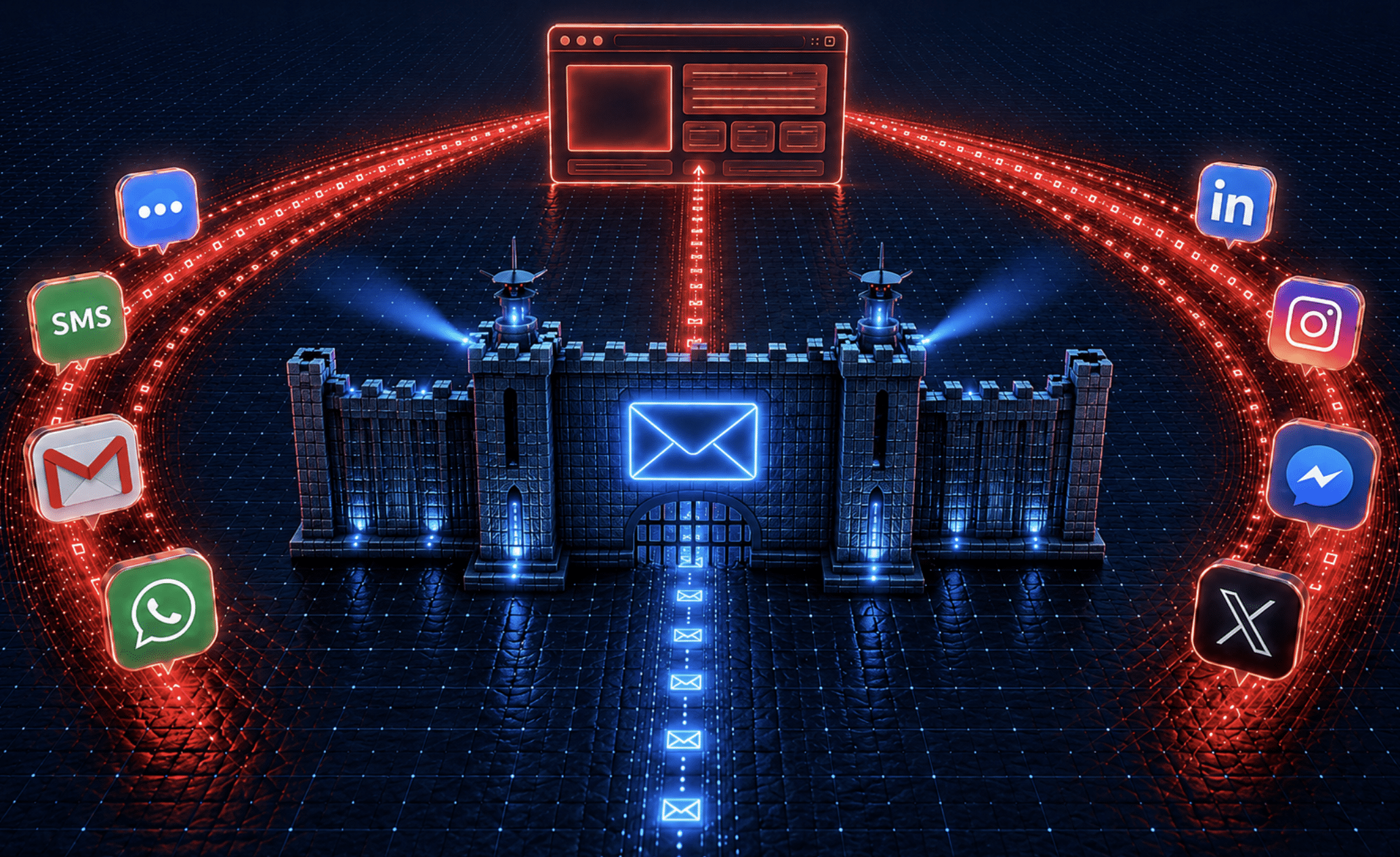
Ask a security team where phishing lives and the answer is reflexive: the inbox. That is where the budget goes — secure email gateways, DMARC enforcement, URL detonation sandboxes, banner warnings, awareness training built around “check the sender.” It is a formidable stack, and it works. Which is exactly why attackers stopped fighting it.
We analyzed every verified phishing page in our data that was actually opened in the browser in 2026 so far — hundreds of distinct campaigns across the enterprise fleets PIXM protects. Our finding: 60% of those phishing clicks arrived through channels outside corporate email. Not spam that slipped past the filter — traffic the email security stack never had a chance to inspect, because it never touched a mail server the enterprise controls.
The corporate inbox is no longer where phishing happens. It is where phishing used to happen, and where most of the defense budget still sits. In this post we walk through a couple of the flank channels the way an attacker does — starting on the employee’s personal channels, then through the paid lanes: search ads, social placements, and ad networks — with real captures showing how each one leaves its fingerprints in the URL.
The personal flank: from a text message to the corporate mailbox
Start with the lane that best explains why this is an enterprise problem and not an employee’s personal one. The campaign families we have tracked continuously since early 2024 run a kill chain that never touches a corporate system until the damage is already done:
- The lure arrives where no corporate control can see it. A text message, or a note to a personal webmail account — frequently sent from the real, hijacked account of someone the victim actually knows. No corporate mail server is involved, so no gateway scores it, no sandbox detonates it, no warning banner fires.
- The link lands somewhere legitimate. A genuine e-invitation — a Paperless Post-style e-card — hosted on real invitation infrastructure with a clean reputation. Nothing on the page is malicious yet, so reputation-based tools wave it through.
- “View invitation” asks the victim to sign in. The invite presents a choice of email providers, then serves a pixel-perfect Outlook / Microsoft 365 sign-in page. This is the pivot: what looked like a social nicety is now a credential harvest.
- The credentials it captures are corporate. An employee who signs in with the work account has just handed over the keys to the corporate mailbox — and from there the attacker runs internal phishing, invoice fraud, and data collection from a trusted address. And MFA alone is not a reliable backstop: modern kits increasingly run as adversary-in-the-middle relays that proxy the real login — MFA prompt included — and capture the authenticated session. The hijacked account then seeds the next round of invitations.
Here is what steps 2 through 4 look like from the victim’s seat — both images are real captures from our corpus:
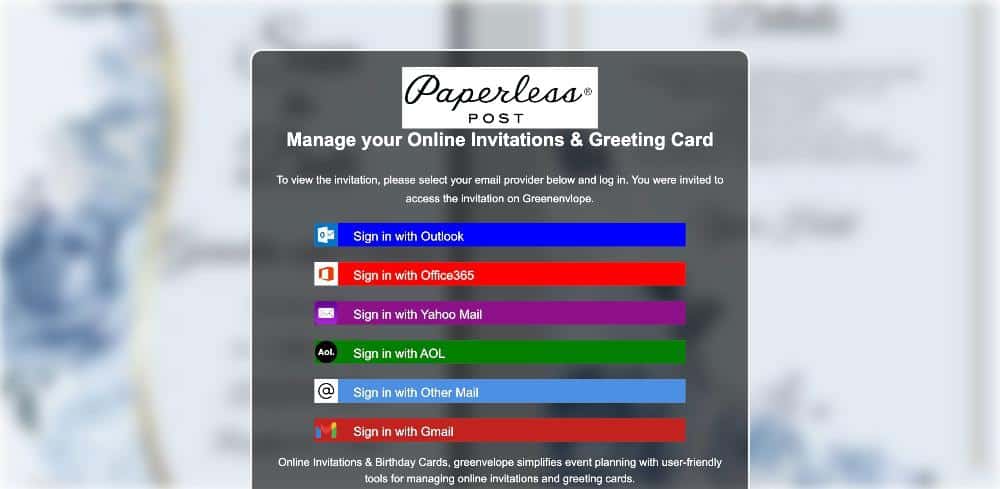
The “invitation”: a fake Paperless Post page that asks the victim to sign in with an email provider before viewing the card — Outlook and Office 365 at the top of the menu.
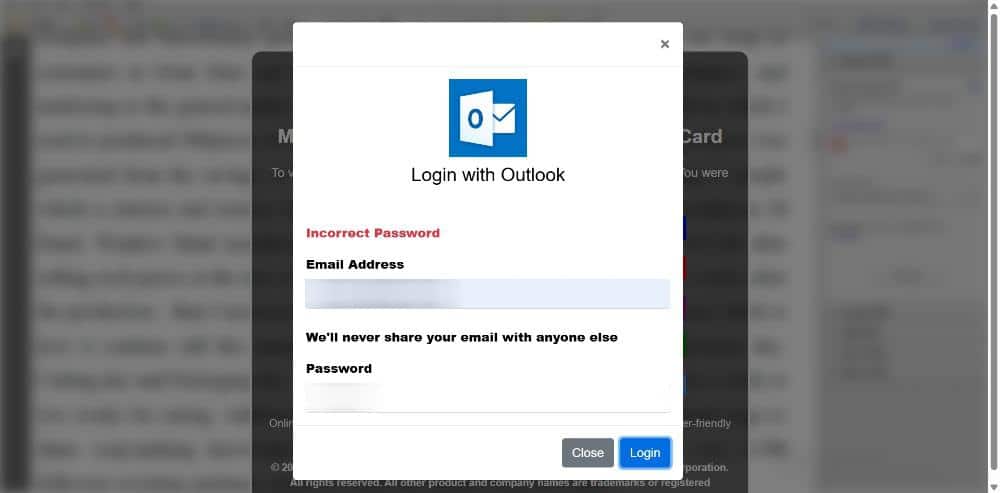
Choosing Outlook serves a pixel-perfect sign-in modal, the victim’s address pre-filled (redacted). The fake “Incorrect Password” error prompts a careful second entry of the password.
The delivery was personal; the blast radius is enterprise. And on BYOD and mixed-use devices the two are one screen apart — the personal inbox where the invite lands is open in the browser right next to the corporate tabs. We broke this campaign family down end to end in Your Credentials are Invited.
The paid flank: search, social, and ad networks
The other flank is simply bought. Instead of compromising an account, the attacker purchases the click — a search placement, a social ad, a sponsored tile — and lets the platform deliver the victim. You do not need our classifier to see it: the delivery receipt is right in the URL, in the tracking parameters ad networks append when a user clicks a placement. Three real captures from this year (domains defanged, identifiers truncated):
Search ads — malicious results purchased above the organic listing the victim was actually looking for. Google Ads parameters on a Heroku-hosted fake security-alert page, June 2026:
https://derckuin-03-003-8fe60fd563e6.herokuapp[.]com/
  ?gad_source=5               // Google Ads traffic source
  &gad_campaignid=23910738475 // the campaign that paid for the click
  &gclid=EAIaIQobChMIkp3Cy…   // Google's click identifier
Social media ads — paid placements running fake security-alert funnels and credential lures with a platform’s implicit endorsement. We documented a June wave of exactly this in Ad-Funded Phishing. This capture is from April — note the hostname: the attacker put “viruswarning” and the campaign date in the domain itself:
https://viruswarning0424usd2pkku.z13.web.core.windows[.]net/
  ?utm_medium=paid            // a purchased placement, by its own label
  &utm_source=fb              // ...on Facebook
  &utm_campaign=1202438426…   // the attacker's ad-campaign ID
  &fbclid=IwY2xjawRYeFhle…    // Facebook's click identifier
Content-recommendation ads — the “sponsored content” tiles familiar from mainstream news and media sites, and the most common paid lane in our data. A reader browsing a legitimate page clicks a promoted tile and lands in a browser-locking fake virus alert with a toll-free “support” number — a scam we dissected end to end in Engineered Panic. One such page, on Azure static hosting, March 2026:
https://w9what09nw3w0602c018.z13.web.core.windows[.]net/index.html
  ?utm_source=taboola       // the ad network names itself
  &utm_medium=referral      // a paid content-recommendation placement
  &tblci=GiCpbXAXF3BGze…    // Taboola's per-click tracking ID
Every one of those clicks shares a property that should unsettle anyone whose anti-phishing program is email-shaped: there is no gateway. No SEG scores the sender, because there is no sender. No sandbox detonates the link, because no email carried it. The first security-relevant event in the entire kill chain is a page rendering in an employee’s browser.
And these two lanes are illustrations, not an inventory. The same flanking logic arrives through SMS and messaging apps, collaboration tools, QR codes, compromised sites sitting in organic search results — any channel that can put a link in front of an employee without crossing the corporate mail server.
What still arrives by email
To be clear about what remains: a substantial minority of what we catch — much of it adversary-in-the-middle credential phishing aimed at Microsoft 365 — still arrives the traditional way, addressed to the organizational mailbox. Some of those pages reach us pre-filled with the victim’s work email address, direct evidence of targeted email delivery. Email phishing is not dead. It has simply become the minority share of what users actually click.
Why the AI era accelerates this
Attackers concentrate effort where defense is thinnest, and the economics have never favored the flank more. Generative tooling has collapsed the cost of producing what non-email phishing runs on: convincing ad creative, brand-perfect landing pages, endless copy variants to cycle past ad-network review, and disposable domains skinned in minutes. Phishing-as-a-service kits industrialized the back end; AI content production industrialized the front. The result is that a single operator can run polished campaigns across ad networks, social platforms, and SMS simultaneously — channels where nothing equivalent to twenty years of email security investment stands in the way.
The corporate inbox, meanwhile, keeps getting harder to phish. That is a genuine win for email security — and it is precisely why the traffic moved.
How we measured this
A note on method, because a headline number deserves one. Each event in this analysis is a verified phishing page a real user reached at point of click in 2026, deduplicated by campaign. About four in ten of those pages carried paid-advertising click fingerprints preserved in their URLs — direct evidence, no inference required. The 60% overall figure adds delivery-channel classification by technique family for pages whose URLs carry no delivery fingerprint, and we hold it with an honest confidence band of roughly 55–70%. One bias worth naming cuts in our favor: email-delivered phish faces layers of upstream filtering before a user can ever click it, while ad-delivered phish faces almost none — which is not a distortion of the finding. It is the finding.
What to do about it
- Audit your controls against the click map, not the mail flow. List every channel that delivered a phishing click in the last quarter — ads, social, SMS, personal webmail — and ask which of your tools would have been in the path. For most stacks the honest answer is: only the ones that live in the browser.
- Extend awareness training past the inbox. “Check the sender” is useless advice for a sponsored tile on a news site. Users need to treat login pages and urgent virus warnings as suspect wherever they appear.
- Put detection at the point of click. The browser is the one place every one of these channels converges — the ad click, the SMS link, the personal-inbox invite, and the corporate email all end at a page rendering in front of a user. PIXM’s computer vision evaluates what that page is the moment it renders — a fake Microsoft login, an engineered virus alert — regardless of what channel delivered it or how new the domain is. When the majority of phishing never crosses your mail server, the browser is not an extra layer. It is the last one standing.
If you are interested in seeing how PIXM can help prevent attacks like these for your organization, book a demo here: pixmsecurity.com/request-demo/
Recent Comments